
IVR Survey Dashboard
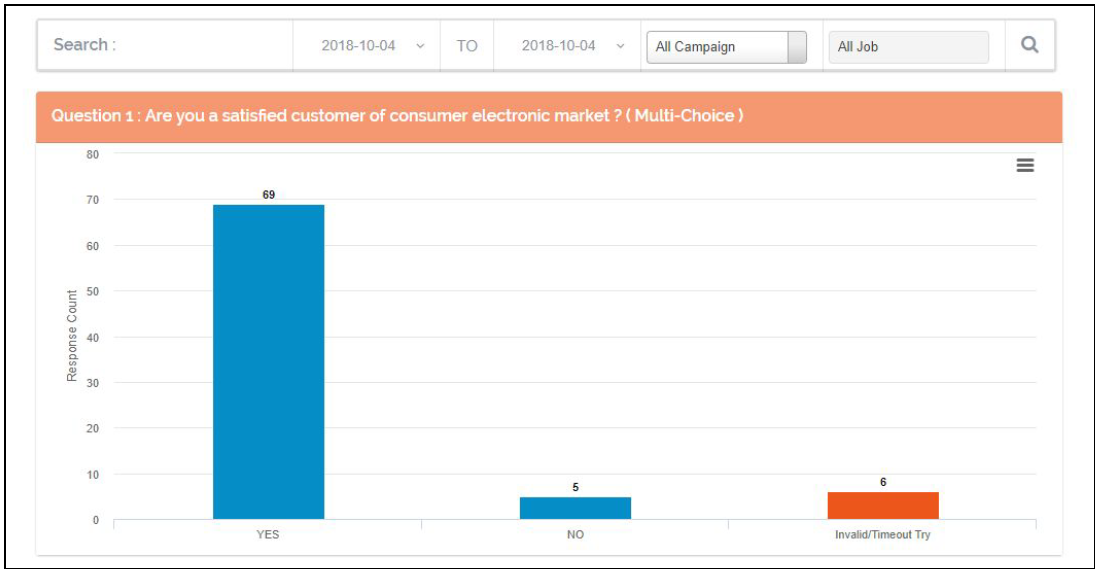
This Dashboard displays the Complete details for the selected IVR Survey, user can see the Response & Response count for the question of the selected survey.
User can add multiple Survey by selecting Survey from dropdown and click on + sign to add. All selected survey will be displayed as seen in below image.

All the Question are listed of the selected survey with their Response and Response count as seen in below image.
User can search the data based on the date range and Campaign & job.
Note :- This Dashboard is Available only when user have license for the IVR Survey.
Leave A Comment?